
UpWiz
  • Home
  • Features
  • Pricing
  • FAQ
UpWiz.

Update with confidence.

© 2026 UpWiz

Start Trial
Start Trial Pricing
Start Trial

Getting Started

2
  • What Is UpWiz
  • Install and Activate

Analyzing Updates

5
  • The Details Drawer
  • Changelog Viewer
  • Vulnerability Detection
  • AI Risk Analysis
  • Understanding AI Recommendations

Pro Features

6
  • What Is Included in Pro
  • Activating UpWiz Pro
  • Smart Auto-Updates
  • Backup and Rollback
  • Enhanced AI Analysis (Pro)
  • Safety Settings: Release Delay, Health Check, and Auto-Rollback

Settings

8
  • Settings Overview
  • Notifications and Email Settings
  • Auto-Update Settings
  • Exclusions: Hiding and Excluding Plugins
  • Update Schedule
  • Backup Settings
  • Site Health Tab
  • Auto-Update Log

The Dashboard

6
  • Dashboard Interface Overview
  • Update Severity Labels
  • Filtering and Searching Updates
  • Hiding Plugins from the Dashboard
  • Refresh Button and AI Usage Badge
  • Plugin Cards and Status Icons

Troubleshooting

5
  • Connection and API Issues
  • AI Analysis Errors
  • Update Failures
  • License Validation Issues
  • Site Health Check Failures

Updating Plugins

3
  • One-Click Updates
  • The Sequential Update Queue
  • Premium Plugins and Vendor Links

FAQ

6
  • Privacy Overview: What Data UpWiz Collects
  • Vulnerability Data Sources
  • API Key and License Key Safety
  • Pre-Purchase Questions
  • Hosting and Compatibility Questions
  • Billing and Subscription Questions

License and Plans

5
  • License Options: Free, Trial, and Pro
  • Connecting a License Key
  • Starting a Free Trial
  • License and Plan Tab
  • Plan Comparison
View Categories
  • Home
  • UpWiz Docs
  • Getting Started
  • What Is UpWiz

What Is UpWiz

< 1 min read

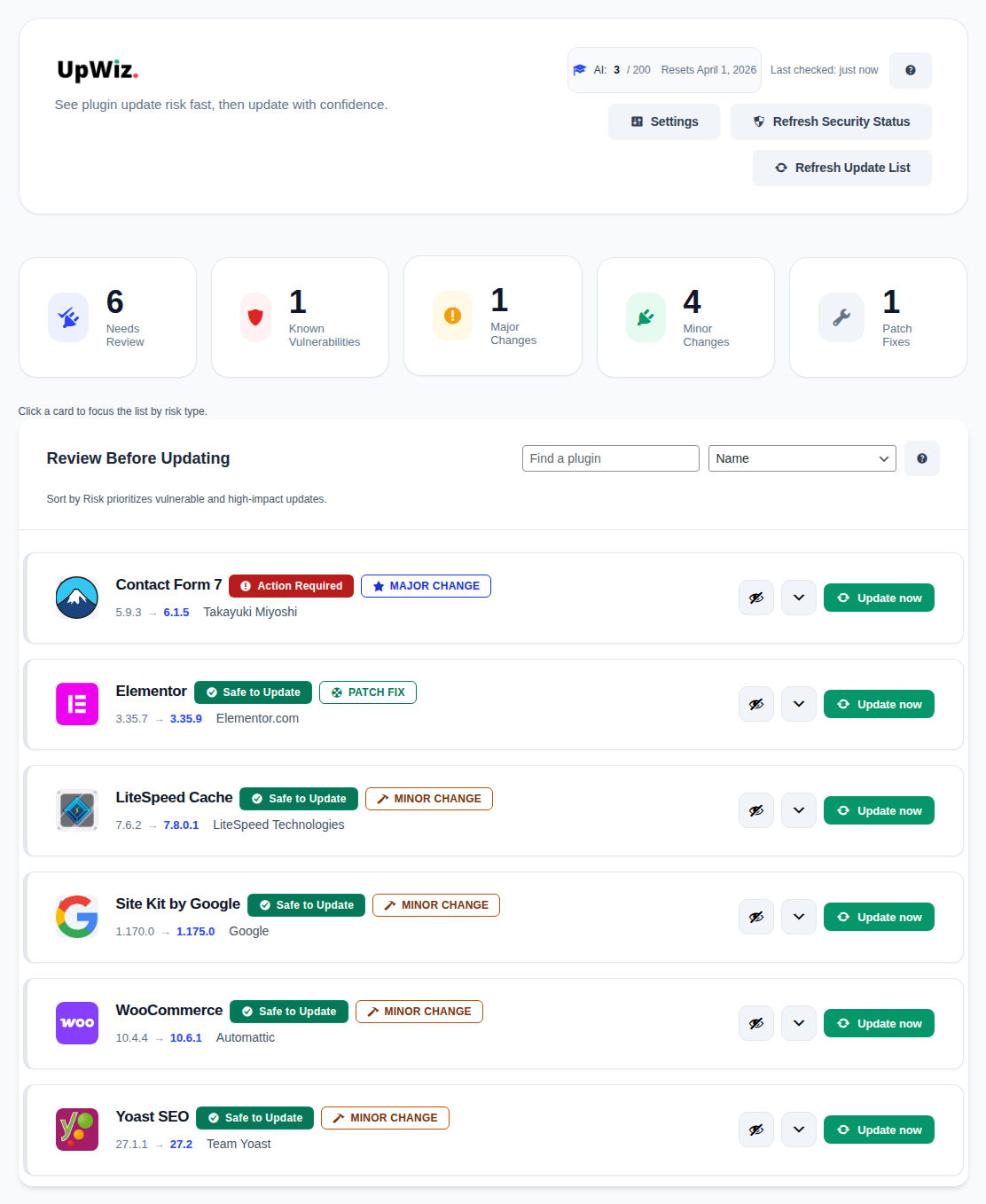
UpWiz dashboard overview showing plugin update cards

UpWiz is a WordPress plugin update safety layer. It helps you review plugin updates in one place before you decide what to install.

What you can do #

  • Review pending plugin updates in a dedicated dashboard.
  • Read changelogs and release notes without leaving WordPress.
  • Check for known public vulnerability information before you update.
  • Use AI guidance to help prioritize review when you have a connected key.
  • Use Pro for safer automation and faster recovery on the site that matters most.

Who it is for #

UpWiz is built for site owners, freelancers, and small agencies who want fewer surprises when updating plugins, especially on business-critical or plugin-heavy sites.

Important limits #

  • UpWiz helps you make safer update decisions, but it cannot guarantee that an update will never cause issues.
  • Restore points help with plugin recovery, but they are not a replacement for full-site backups.

What are your Feelings

  • Happy
  • Normal
  • Sad

Share This Article :

  • Facebook
  • X
  • LinkedIn
  • Pinterest
Install and ActivateInstall and Activate
Table of Contents
  • What you can do
  • Who it is for
  • Important limits
UpWiz

Safer WordPress plugin updates, with changelog review, vulnerability checks, AI summaries when available, and Pro rollback tools.

Product

  • Features
  • Pricing
  • FAQ
  • Start Trial

Resources

  • Documentation
  • Support

© 2026 UpWiz. All rights reserved.

Privacy Policy · Terms of Service