
Update WordPress plugins without wondering what might break
Review pending plugin updates with changelog context, known vulnerability checks, and AI summaries when available. Pro adds protected auto-updates and rollback tools when you want more protection.
Run WooCommerce or another revenue-critical site? Pro adds release delay, one-at-a-time updates, and rollback so you can update more carefully.
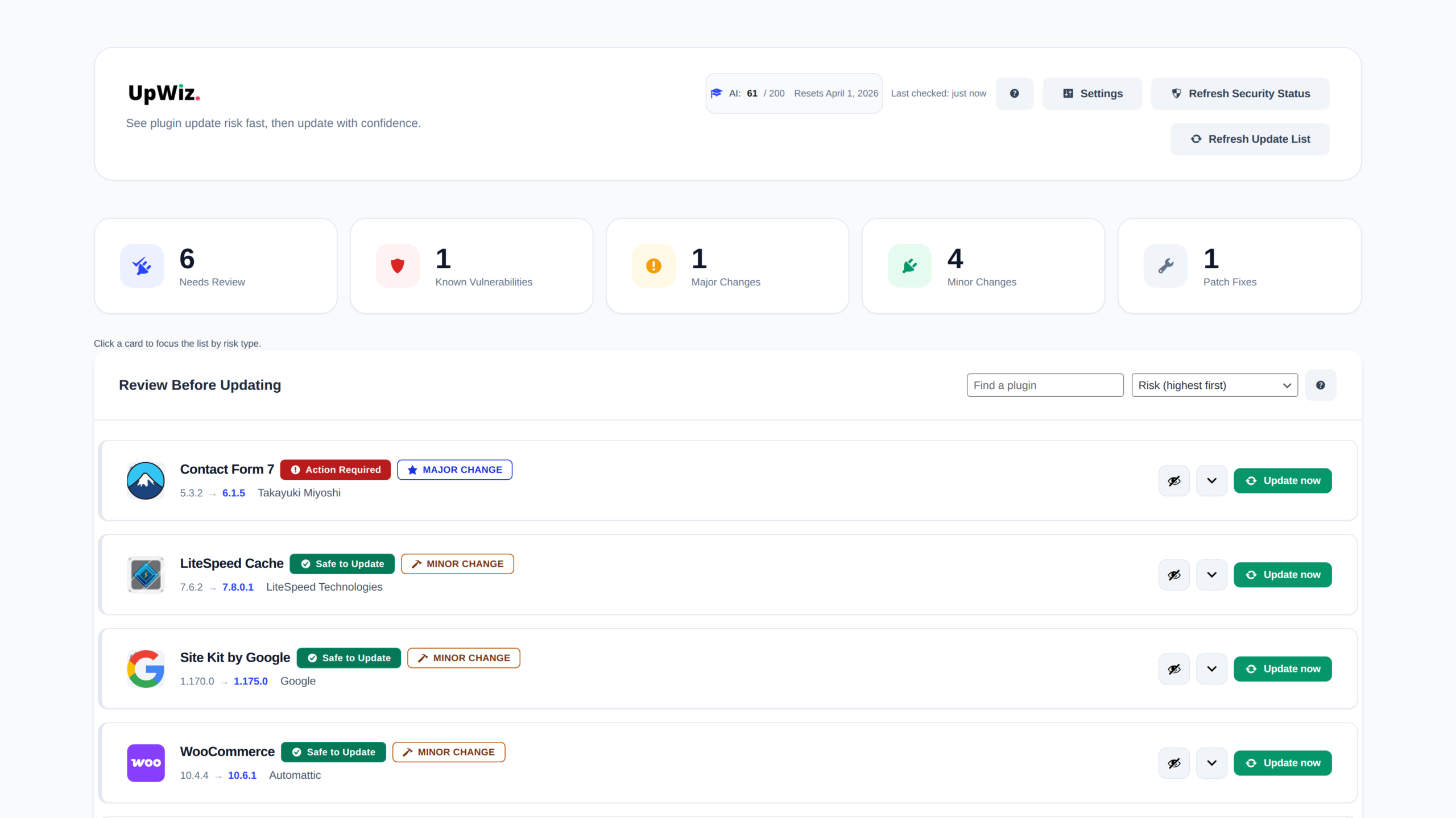
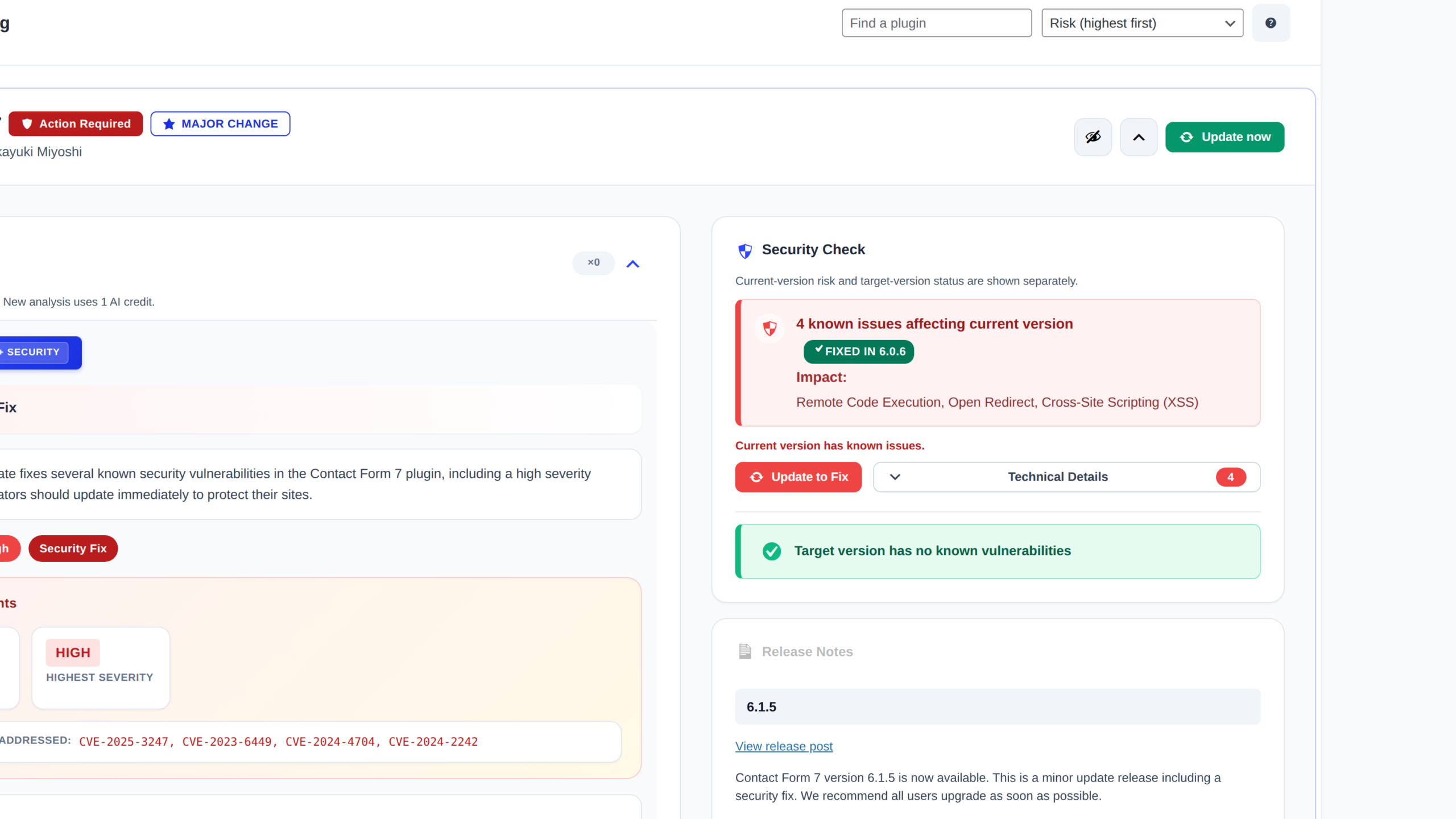
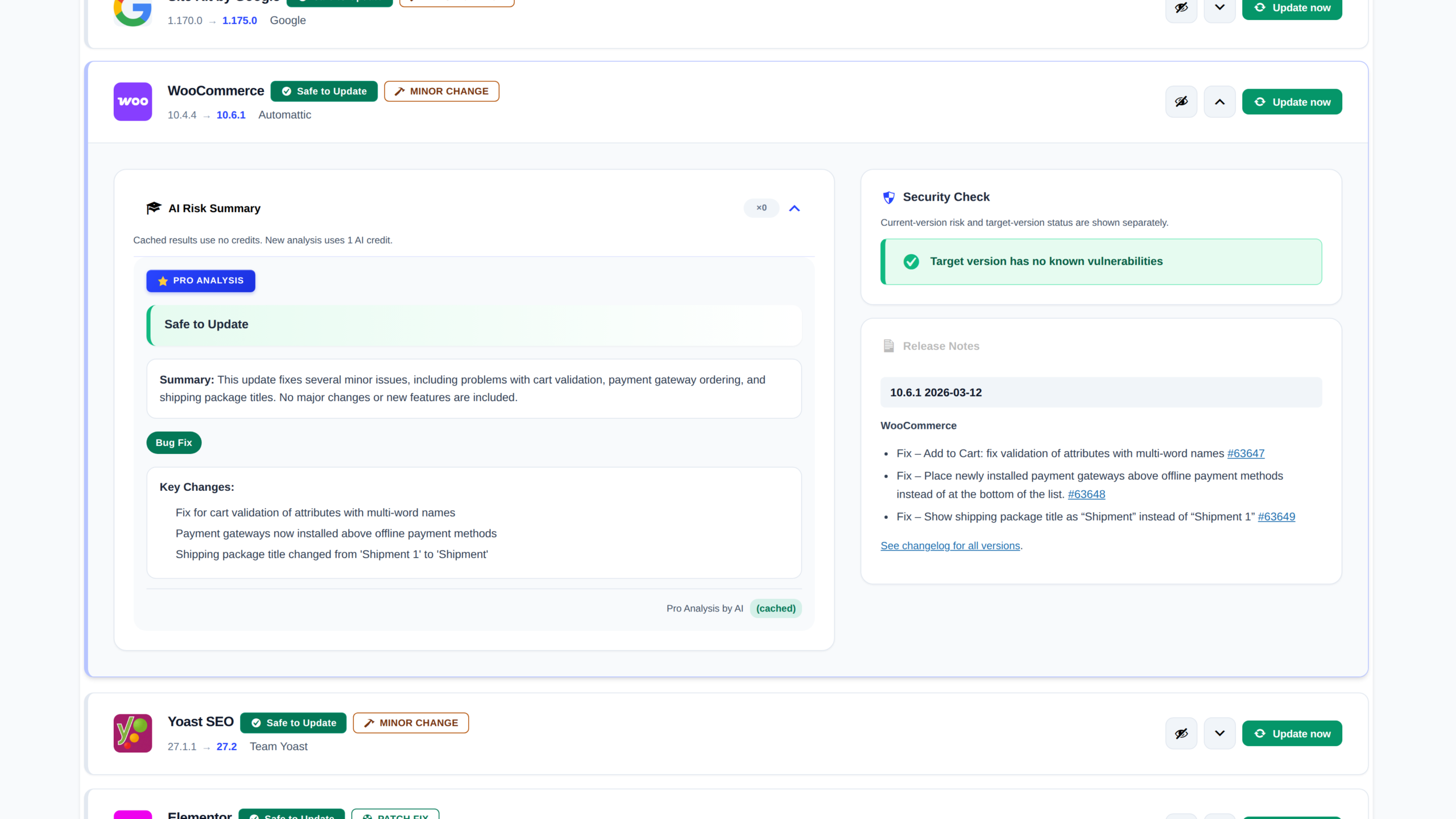
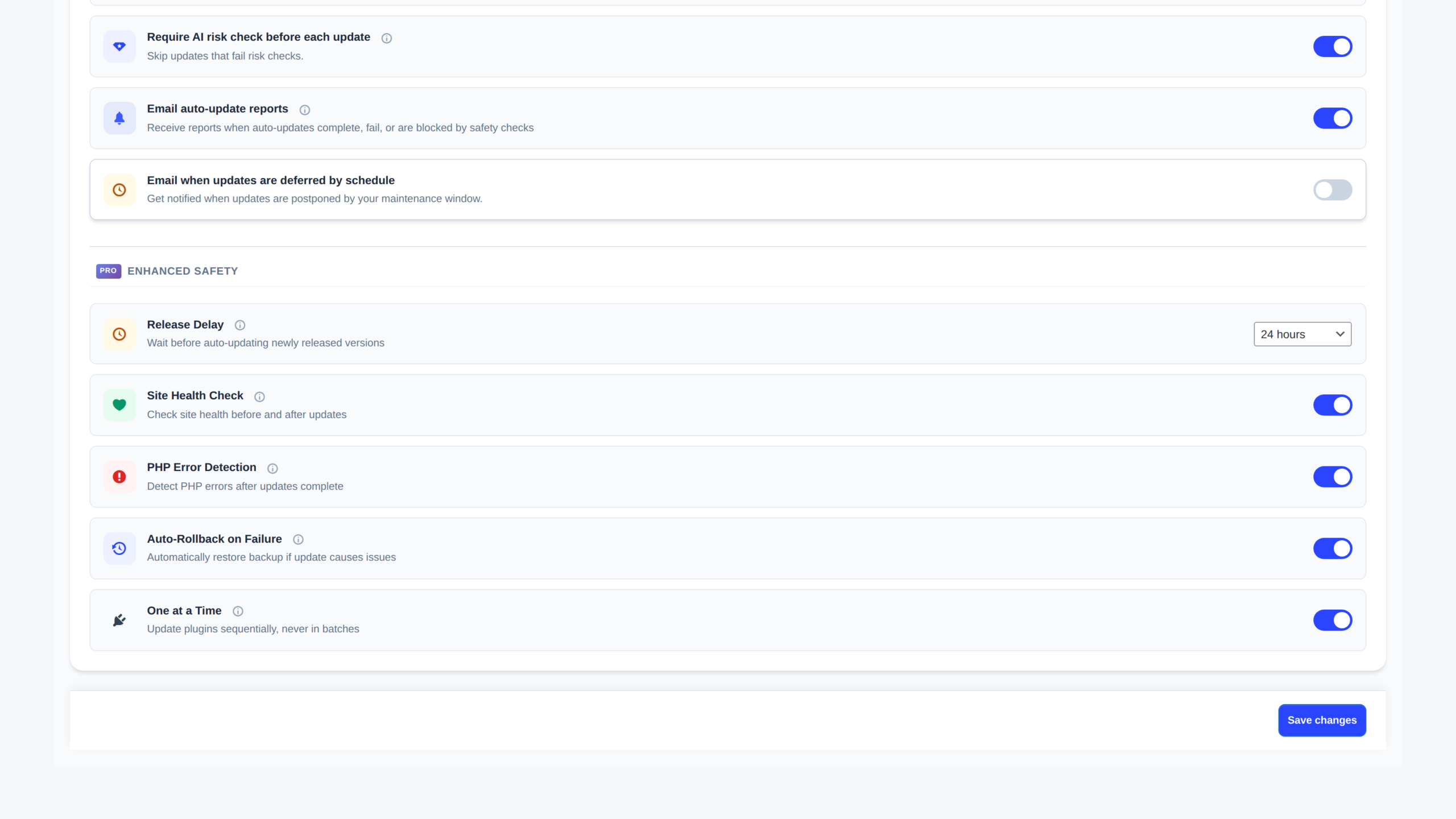
See update risk before you click anything
UpWiz surfaces risky updates, pending work, and plugin status in one command center so you can decide faster.
Works with the plugins you already use
A safer update routine in 4 steps
UpWiz helps you review updates first. If you want more automation, Pro adds protected auto-updates and recovery tools.
Install & Activate
Install & Activate
Install UpWiz from the WordPress plugin directory and complete the quick setup.
Review Updates
Review Updates
See available plugin updates in one place and focus on what needs review first.
Review Details
Review Details
Open the details view to review changelog notes, known vulnerabilities, and AI guidance when available.
Automate with Pro
Automate with Pro
If you want automation, Pro can run updates with release delay, safety checks, and rollback options.
A calmer way to handle plugin updates
See what is changing, spot known risks, and use Pro when you want protected automation.
Update Dashboard
See available plugin updates in one place, with clear version-change labels and next steps.
Vulnerability Detection
Check whether known public vulnerabilities affect your current version or the version you plan to update to.
Risk Review
Review the changelog and get an AI summary when available so you can make a faster update decision.
Protected Auto-Updates
With Pro, you can automate plugin updates with release delay, health checks, and rollback controls.
One-Click Rollback
UpWiz can create restore points before updates. Pro adds one-click rollback so you can return to the previous version faster when needed.
Alerts & Reports
Get security alerts and weekly summaries in Free, plus a daily digest in Pro.
Maintenance Windows
Choose when Pro auto-updates are allowed to run so updates stay inside your preferred window.
One-at-a-Time Updates
Pro can run auto-updates one at a time, which makes problems easier to spot and recovery easier to manage.
Update Exclusions
In Pro, exclude specific plugins from auto-updates. In any plan, you can also hide plugins from the UpWiz dashboard.
Plugin risk can turn into downtime, cleanup, and urgent fixes fast
These numbers show why clearer update visibility matters before a plugin issue becomes a business problem.
96%
of new WordPress vulnerabilities are tied to plugins.
Source: Patchstack 202492%
of successful WordPress compromises involve outdated plugins.
Source: Sucuri22min
average time between attacks on WordPress sites.
Source: WordfenceManual updates vs. UpWiz
Same job, much less guesswork
Plugin updates should not feel like a coin toss.
- Click update and hope for the best
- Guess whether a release is stable
- Read changelogs by hand
- Make backups manually every time
- Risk breaking something on the live site
- Keep checking for vulnerabilities yourself
- Review changelog notes before you update
- See known security issues for your current and target versions
- Use AI summaries when you want a faster read
- Delay new releases before Pro auto-updates run
- Choose when Pro auto-updates are allowed to run
- Create restore points before updates and roll back in Pro if needed
What people say after using UpWiz
"I manage a lot of client sites, and UpWiz makes update day a lot less stressful. The AI summary catches the stuff I might have skimmed past, and rollback has already saved me more than once."
"We look after a few WooCommerce stores, so updates used to turn into a whole ritual. With UpWiz, they are much easier to plan, and we are not hovering over the site every time something changes."
"I am not very technical, so plugin updates always made me nervous. UpWiz gives me a clearer idea of what is changing and makes it much easier to recover if something goes wrong."
Straightforward pricing
Start free for safer update decisions. Upgrade when you want protected automation and recovery.
Free
A solid safety layer for one site
- Dedicated update dashboard
- Known vulnerability checks
- 20 AI analyses per month
- Restore points before updates
- Security alerts and weekly summary
- 1 WordPress Site
Pro
Automation and rollback for the site you care about most
- 200 AI analyses per month
- Protected auto-updates
- Auto-rollback on failure
- One-click manual rollback
- Release delay for new updates
- Daily digest
- Custom maintenance windows
- One-at-a-time update mode
- 1 WordPress Site
Start with a 7-day trial. Paid plans stay covered by a 14-day money-back guarantee. Cancel anytime.
Pro Plus
A better fit for freelancers and small agencies
- 500 AI analyses per month
- Up to 3 WordPress sites
- Protected auto-updates
- Auto-rollback on failure
- One-click manual rollback
- Release delay for new updates
- Daily digest
- Custom maintenance windows
- One-at-a-time update mode
Start with a 7-day trial. Paid plans stay covered by a 14-day money-back guarantee. Cancel anytime.
A safer way to try Pro
Try Pro with a 7-day trial. If you keep a paid plan, you still get a 14-day money-back guarantee, plus release delay, health checks, and rollback tools for safer automation.
Free vs Pro vs Pro Plus
See what changes from plan to plan.
| Feature | Free | Pro | Pro Plus |
|---|---|---|---|
| Update Dashboard | ✓ | ✓ | ✓ |
| Vulnerability Detection | ✓ | ✓ | ✓ |
| System Health Diagnostics | ✓ | ✓ | ✓ |
| Security Alerts & Weekly Summary | ✓ | ✓ | ✓ |
| AI Analyses / Month | 20 | 200 | 500 |
| Sites | 1 | 1 | 3 |
| Backup Storage | 100 MB | 500 MB | 500 MB |
| Backup Retention | 7 days | 30 days | 30 days |
| Protected Auto-Updates | ✗ | ✓ | ✓ |
| Auto-Rollback on Failure | ✗ | ✓ | ✓ |
| One-Click Manual Rollback | ✗ | ✓ | ✓ |
| Release Delay | ✗ | ✓ | ✓ |
| One-at-a-Time Updates | ✗ | ✓ | ✓ |
| Maintenance Windows | ✗ | ✓ | ✓ |
| Exclude Plugins from Auto-Updates | ✗ | ✓ | ✓ |
| Hide Plugins in Dashboard | ✓ | ✓ | ✓ |
| Daily Digest | ✗ | ✓ | ✓ |
| Price | Free | $7/mo | $10/mo |
Free
Free
- Update Dashboard ✓
- Vulnerability Detection ✓
- System Health Diagnostics ✓
- Security Alerts & Weekly Summary ✓
- AI Analyses / Month 20
- Sites 1
- Backup Storage 100 MB
- Backup Retention 7 days
- Protected Auto-Updates ✗
- Auto-Rollback on Failure ✗
- One-Click Manual Rollback ✗
- Release Delay ✗
- One-at-a-Time Updates ✗
- Maintenance Windows ✗
- Exclude Plugins from Auto-Updates ✗
- Hide Plugins in Dashboard ✓
- Daily Digest ✗
Pro
Most Popular
$7/mo
- Update Dashboard ✓
- Vulnerability Detection ✓
- System Health Diagnostics ✓
- Security Alerts & Weekly Summary ✓
- AI Analyses / Month 200
- Sites 1
- Backup Storage 500 MB
- Backup Retention 30 days
- Protected Auto-Updates ✓
- Auto-Rollback on Failure ✓
- One-Click Manual Rollback ✓
- Release Delay ✓
- One-at-a-Time Updates ✓
- Maintenance Windows ✓
- Exclude Plugins from Auto-Updates ✓
- Hide Plugins in Dashboard ✓
- Daily Digest ✓
Pro Plus
$10/mo
- Update Dashboard ✓
- Vulnerability Detection ✓
- System Health Diagnostics ✓
- Security Alerts & Weekly Summary ✓
- AI Analyses / Month 500
- Sites 3
- Backup Storage 500 MB
- Backup Retention 30 days
- Protected Auto-Updates ✓
- Auto-Rollback on Failure ✓
- One-Click Manual Rollback ✓
- Release Delay ✓
- One-at-a-Time Updates ✓
- Maintenance Windows ✓
- Exclude Plugins from Auto-Updates ✓
- Hide Plugins in Dashboard ✓
- Daily Digest ✓
We built this after too many routine updates broke client sites.
"We got tired of watching routine plugin updates knock good sites offline. UpWiz came out of that frustration. We wanted regular site owners to have a safer, calmer way to update without keeping a developer on standby."
Frequently Asked Questions
The questions we hear most often about how UpWiz works.
No extra server setup is required. UpWiz runs inside WordPress. Some features, such as license validation, AI analysis, and vulnerability checks, rely on normal outbound HTTPS access.
UpWiz may send plugin names and versions when checking updates, running vulnerability checks, validating your license, or requesting AI analysis. It does not send site content, customer data, passwords, or admin credentials.
Yes. Premium plugins can still appear in the dashboard if WordPress reports an available update. When UpWiz can show useful release notes, it does. If not, it links you back to the vendor for manual review.
Your plan drops back to Free automatically. Pro-only automation and rollback features turn off, while the dashboard, changelog review, vulnerability checks, and Free AI allowance remain available.
Free gives one site clearer update decisions: a dedicated dashboard, changelog review, vulnerability checks, restore points before updates, alerts, and 20 AI analyses per month. Pro ($7/mo) adds protected auto-updates, release delay, maintenance windows, one-at-a-time updates, daily digest emails, and rollback tools for one site. Pro Plus ($10/mo) gives freelancers and small agencies the same protected workflow for up to 3 sites.
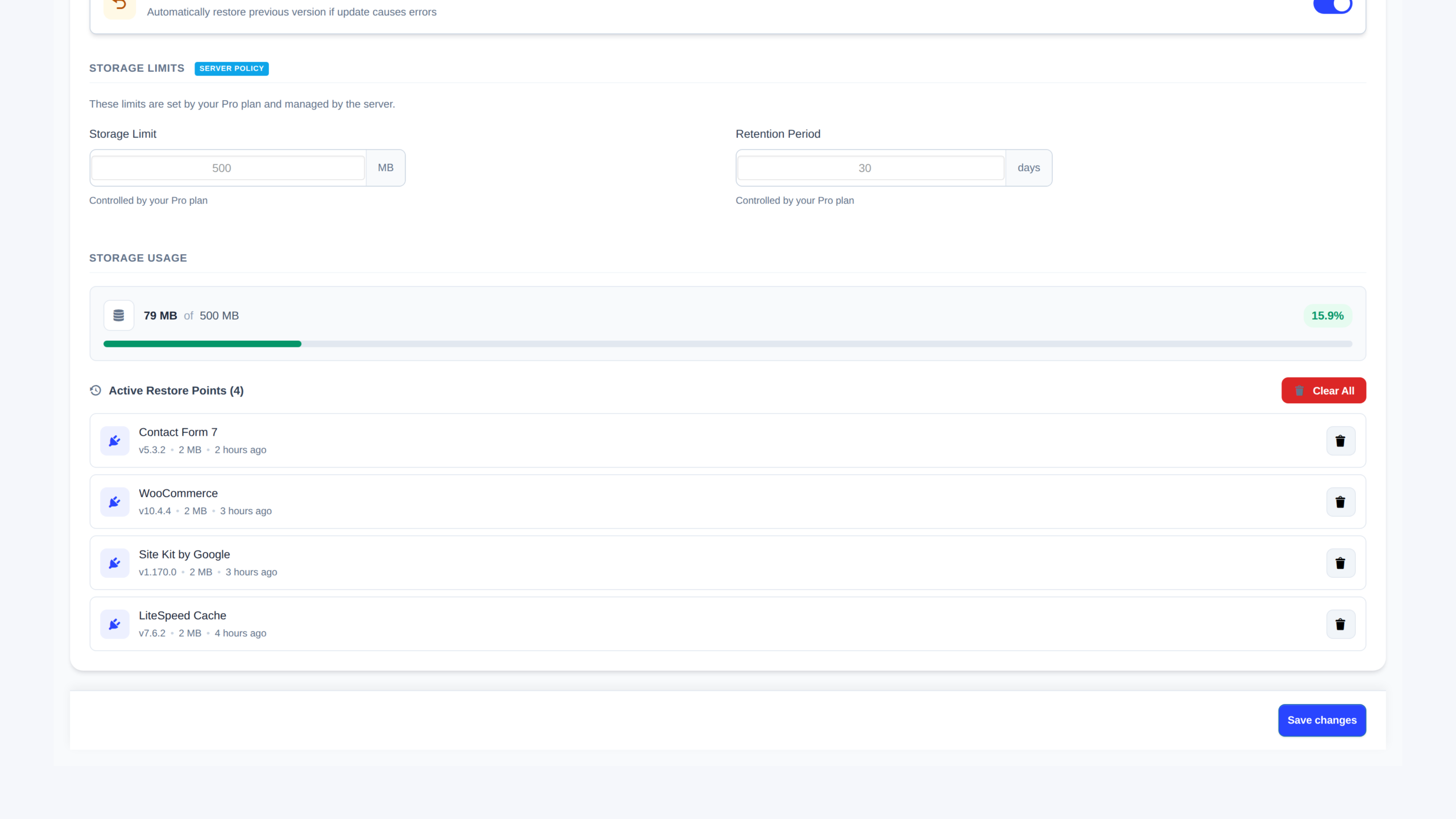
Restore points are stored on your own server. Free includes up to 100MB, and Pro or Pro Plus include up to 500MB. You can review storage and retention in Settings.
With Pro, you can enable one-at-a-time updates, health checks, and auto-rollback. If an auto-update fails those checks, UpWiz can return the plugin to the previous version and email you the result.
It can help you be more cautious, but it is not a guarantee. For WooCommerce or other revenue-critical plugins, review the changelog first and use Pro features like release delay, one-at-a-time updates, exclusions, and rollback options when appropriate.
Yes. In Pro, you can exclude specific plugins from auto-updates. In any plan, you can also hide plugins from the UpWiz dashboard.
Ready for calmer plugin updates?
Try UpWiz and make updates feel routine again.